# Data Layer (https://webmetic.de/docs/en/data-layer)
With the Data Layer, your server learns during a visit which company is behind it, for example Bergquell Mineralbrunnen GmbH. At the end you'll have:
- a Data Layer key
- a request that returns the ID and name of the company behind a visit's IP address, or `null` if Webmetic knows none
For Matomo, the ready-made [Matomo plugin](https://webmetic.de/docs/en/integrationen/matomo-plugin) is available and uses the same key.
## Before you start [#before-you-start]
- **Time**: The key and the first request take a few minutes to set up.
- **Account**: You need a Webmetic account on the Enterprise plan.
- **Access**: Your server must reach `https://hub.webmetic.de` over the internet.
- **Rights**: An admin generates the key. Other users don't see the **API keys** window and ask an admin for the key. If a partner manages your account, the partner decides whether **API** appears in the menu.
- **Plan**: Server-side identification is part of the [Enterprise](https://webmetic.de/docs/en/konto/plaene) plan. The lookup currently costs no credits.
## Create the key [#create-the-key]
You need the key from the **Data Layer** card, because the key from the **Visitor Intelligence** card doesn't work here.
The other way round, the Data Layer key doesn't work on the API endpoints.
1. Open [**Menu** > **Integrations** > **API**](https://app.webmetic.de/?menu=api_details). The **API keys** window opens.
2. If the **Data Layer** card shows the text **No key generated yet.**, click **Generate key**. Webmetic shows the new key.
3. In the **Data Layer** card, click the **Copy** icon. Webmetic copies the full key, even when it's masked.
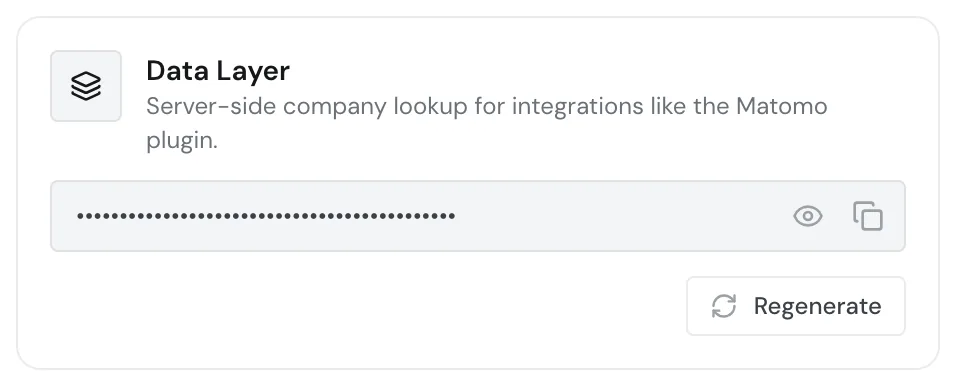
Your account has exactly one Data Layer key, which applies to all your websites and doesn't expire.
Don't click **Regenerate** if you already use the key. After the second click, the old key stops working at once, in the Matomo plugin too, and this can't be undone.
## Send the request from your server [#send-the-request-from-your-server]
For every visit whose company you want to know, send a request to `GET https://hub.webmetic.de/dl` with two headers:
- `Authorization`: your Data Layer key, unchanged and without `Bearer` in front.
- `X-Data-Source`: the public IP address of the visit.
```bash tab="cURL" tab-group="lang"
curl "https://hub.webmetic.de/dl" \
-H "Authorization: wmtc_YOUR_API_KEY" \
-H "X-Data-Source: 203.0.113.42"
```
```js tab="JavaScript" tab-group="lang"
// Node.js 18 or later, on your server
async function lookupCompany(visitorIp) {
const res = await fetch('https://hub.webmetic.de/dl', {
headers: {
Authorization: 'wmtc_YOUR_API_KEY',
'X-Data-Source': visitorIp,
},
signal: AbortSignal.timeout(2000), // your own limit
});
if (!res.ok) throw new Error(`Webmetic /dl: ${res.status}`);
return res.json(); // {"cid": "...", "cn": "..."} or null
}
lookupCompany('203.0.113.42').then((company) => console.log(company));
```
```python tab="Python" tab-group="lang"
import requests
def lookup_company(visitor_ip):
res = requests.get(
"https://hub.webmetic.de/dl",
headers={
"Authorization": "wmtc_YOUR_API_KEY",
"X-Data-Source": visitor_ip,
},
timeout=2, # your own limit
)
res.raise_for_status()
return res.json() # {"cid": "...", "cn": "..."} or None
company = lookup_company("203.0.113.42")
```
The JavaScript and Python samples give up after two seconds, a value you choose yourself, so your page never waits long for the answer.
You don't need Enterprise or an account to try it. With the public [demo key](https://webmetic.de/docs/en/api/schnellstart#try-it-without-an-account) `wmtc_demo` and `X-Data-Source: 203.0.113.42`, `/dl` answers with the invented example company Bergquell Mineralbrunnen GmbH, and with `null` for any other address.
If `X-Data-Source` is missing, Webmetic looks up the address the request comes from, which is your server's address and not the visit's.
Webmetic compares the address character by character, so for a wrongly copied address `/dl` answers with `null` rather than an error. Watch for these points:
- If a proxy, a content delivery network (CDN), or a load balancer sits in front of your server, your server sees its address. Take the visit's address from the header it passes on, for example `X-Forwarded-For`.
- If that header holds several addresses, send only the visit's address.
- Send IPv4 addresses without the `::ffff:` prefix that some servers put in front.
- Send IPv6 addresses in the usual short form in lower case, as most servers return them.
Each request accepts exactly one address, so send one request per visit.
Never call `/dl` from the browser or a tag manager. The key would then sit in your website's code, and anyone who opens your website could read it. Anyone with the key can use your account to look up the company behind any IP address.
## Read the response [#read-the-response]
When Webmetic knows a company for the address, `/dl` answers with status `200` and a JSON object with exactly two fields:
```json
{
"cid": "41ea486a9c95",
"cn": "Bergquell Mineralbrunnen GmbH"
}
```
- `cid`: the company's ID in Webmetic. If the company visited your website, you find it in the API under the same `company_id`.
- `cn`: the company's name. It's `null` when Webmetic knows no name for the ID.
When Webmetic knows no company, the body is `null`, also with status `200`, so check the body in your code rather than the status.
`/dl` doesn't return the industry, size, or domain.
`/dl` names every company Webmetic knows for the address, even if the company has never visited your website.
A lookup creates no visit and no company in the dashboard. The [domain blacklist](https://webmetic.de/docs/en/konto/domain-blacklist) doesn't apply to the Data Layer.
## Pass the response to the tag manager [#pass-the-response-to-the-tag-manager]
If your tags in Google Tag Manager need the company, your server writes the response into `window.dataLayer` when it serves the page. Despite the name, Webmetic itself writes nothing there.
The key stays on your server, because only the response goes into the page.
Webmetic defines no events or variables, so you choose the names yourself, for example:
```html
```
## Reference [#reference]
`/dl` isn't part of the generated API reference, so everything about the endpoint is on this page.
### Request [#request]
| Part | Value |
| --- | --- |
| Method | `GET` |
| URL | `https://hub.webmetic.de/dl` |
| Header `Authorization` | The Data Layer key, without `Bearer` |
| Header `X-Data-Source` | The public IP address of the visit, IPv4 without `::ffff:`. Without the header, the address the request comes from applies |
### Response [#response]
| Case | Status | Body |
| --- | --- | --- |
| Company identified | `200` | `{"cid": "41ea486a9c95", "cn": "Bergquell Mineralbrunnen GmbH"}` |
| Company without a name | `200` | `{"cid": "41ea486a9c95", "cn": null}` |
| No company | `200` | `null` |
### Errors [#errors]
Data Layer errors have a shorter body than the API endpoints: `detail` is a string, not an object with `error` and `message`, for example `{"detail": "DATA_LAYER_KEY_MISSING"}`. So on `/dl`, check `detail` as a string.
| Status | `detail` | Cause | What to do |
| --- | --- | --- | --- |
| 403 | `DATA_LAYER_KEY_MISSING` | The request has no `Authorization` header | Send the key in the `Authorization` header |
| 403 | `DATA_LAYER_KEY_INVALID` | The format is wrong, for example because of `Bearer` in front or a typo | Send the key unchanged |
| 403 | `DATA_LAYER_KEY_NOT_FOUND` | No account has this Data Layer key, for example after **Regenerate** or with the key from the **Visitor Intelligence** card | Copy the current key from the **Data Layer** card |
| 405 | `Method Not Allowed` | The request uses a method other than `GET` | Send the request with `GET` |
| 500 | `DATA_LAYER_KEY_DATABASE_ERROR` | Webmetic couldn't check the key at that moment | Try again later. If the error persists, write to [support](https://webmetic.de/docs/en/konto/support) |
The errors of the API are listed under [Errors](https://webmetic.de/docs/en/api/fehler).
## Data protection [#data-protection]
Clarify with your privacy advisor on which legal basis you send your visits' IP addresses to Webmetic.
## Next steps [#next-steps]
- [Matomo plugin](https://webmetic.de/docs/en/integrationen/matomo-plugin): See identified companies right in Matomo with the same key.
- [Authentication](https://webmetic.de/docs/en/api/authentifizierung): The three API keys and what each one is for.
- [Company](https://webmetic.de/docs/en/api/datenmodell/company): All fields of a company. `cid` is called `company_id` there.