

Example questions
Ask your AI assistant these questions, and it answers straight from your Webmetic data.
You ask in your own words, in English or German. The assistant picks the right tools itself and answers in your language. It reads your data and changes your account only when you ask it to. Below each question you'll find what the answer contains.
Before you start
- Time: The answer to the first question about a date range takes a few seconds, while the assistant answers follow-up questions about the same range faster.
- Account: The tracking code is on your website, and Webmetic has recorded visits. There is no data from before you installed the code.
- Access: Your AI assistant is connected to Webmetic, as described in Connect the AI assistant.
- Rights: Every user of your account can connect the assistant and ask questions, even without admin rights. If you sign in with single sign-on, connect the assistant with an API key, which you get from an admin.
- Plan: The AI assistant works on every plan, including the Free plan and the trial. On the Free plan, the assistant only sees the companies whose names you see. For details, see Free plan.
If your question names no date range, the assistant uses the last 7 days, or the last 30 days for a single company. If your account has several websites, name the website in your question. If the assistant finds nothing, that is an answer and not an error. In that case, ask again with a longer range.
First questions
These questions work on any account with the tracking code, with no further setup:
-
"Which companies visited our website this week?"
You get a list with each company's name, location, industry, relevance, and last visit. The assistant fetches long lists in batches of up to 50 companies.
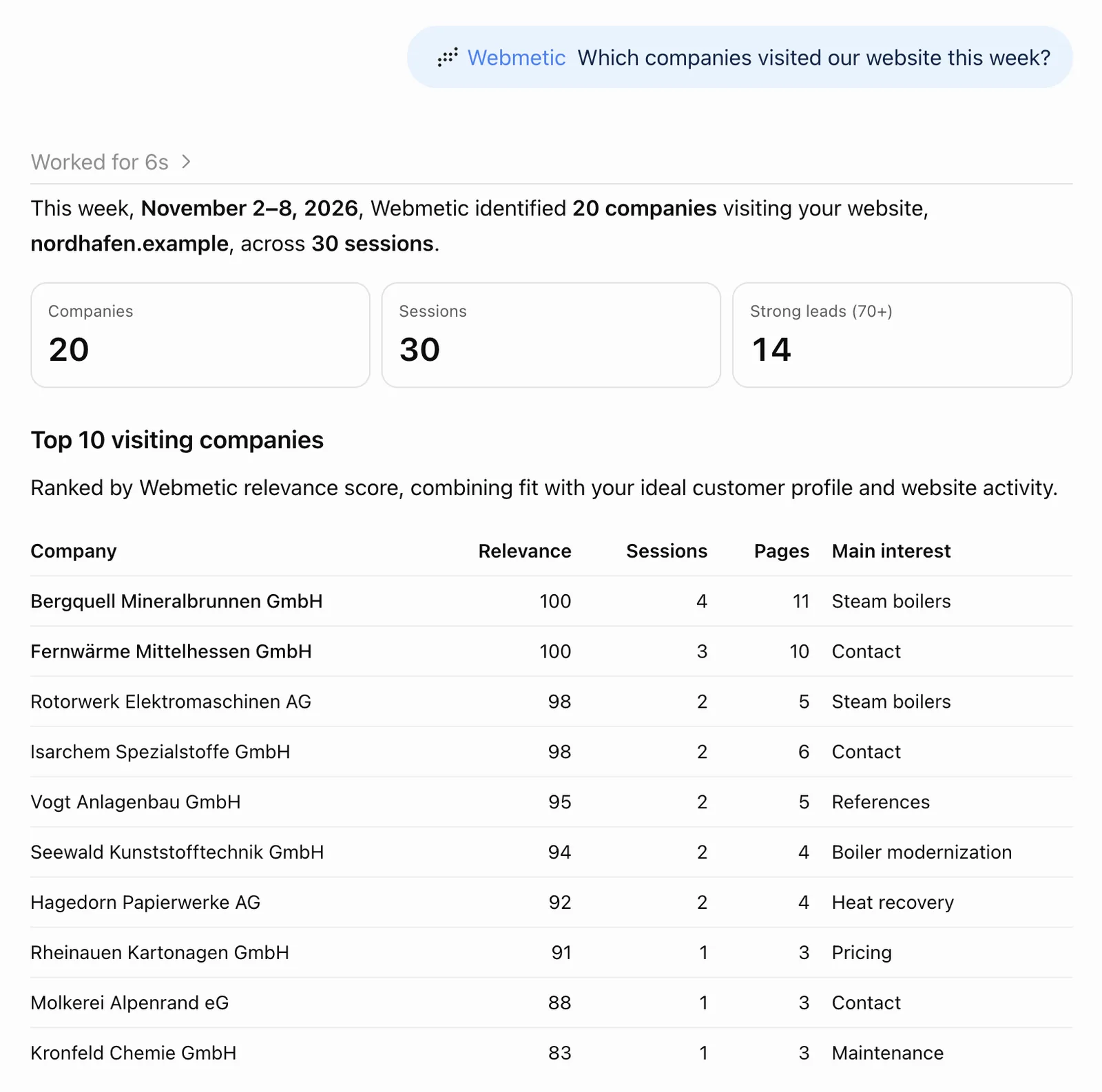
ChatGPT's answer with this week's companies, sorted by relevance -
"Which companies show the strongest buying signals this week?"
You see the most relevant companies with their visits and buying signals such as downloads or forms. The prompt
heisse-leads(hot leads) in your client's prompt menu asks the same question. -
"Who looked at our pricing page this week?"
You see every company that opened your pricing page in that range. If you know the path, add it to the question, for example
/pricing. -
"Give me a weekly report for the last 7 days."
The report covers companies, top pages, sources, campaigns, events, industries, and countries. The prompt
wochenbericht(weekly report) returns the same report.
Set up your account
With these questions you check whether your account and your website are ready, and you set the account up. The questions also work when Webmetic has not recorded a visit yet, and they cost no credits. Start in the chat describes the whole way from the new account to the first notification.
-
"Is our Webmetic account set up correctly?"
You see every registered website with its first and last recorded visit, your plan, whether contacts are set up, and how many credits you have. At the end the assistant names what is still needed, and that is at most the tracking code. Ask this before you spend credits.
-
"What is the tracking code for our website?"
You get your account's tracking code as long as your website has no visit yet. It belongs on every page before
</head>. If the assistant has access to your website, it adds the code itself when you ask. Otherwise you add it yourself or pass it on to your web agency, as described under Installation. -
"Is our tracking code installed correctly on nordhafen.example?"
Webmetic opens your website in a real browser and accepts the cookie banner. You learn whether the code is installed on the website, whether it belongs to your account, and whether it loads before the banner. A check usually takes 2 to 30 seconds, and up to a minute on slow websites. You only need to name the website if your account has several.
-
"Why have we seen no companies since yesterday?"
The assistant looks at the account status first and then checks the tracking setup. For details, see Setup.
-
"Set up our ideal customer profile: mechanical engineering in the DACH region with 50 employees or more."
The assistant shows you the draft and saves it once you confirm. Webmetic then re-rates every identified company. Afterwards, ask for the most relevant companies of the week.
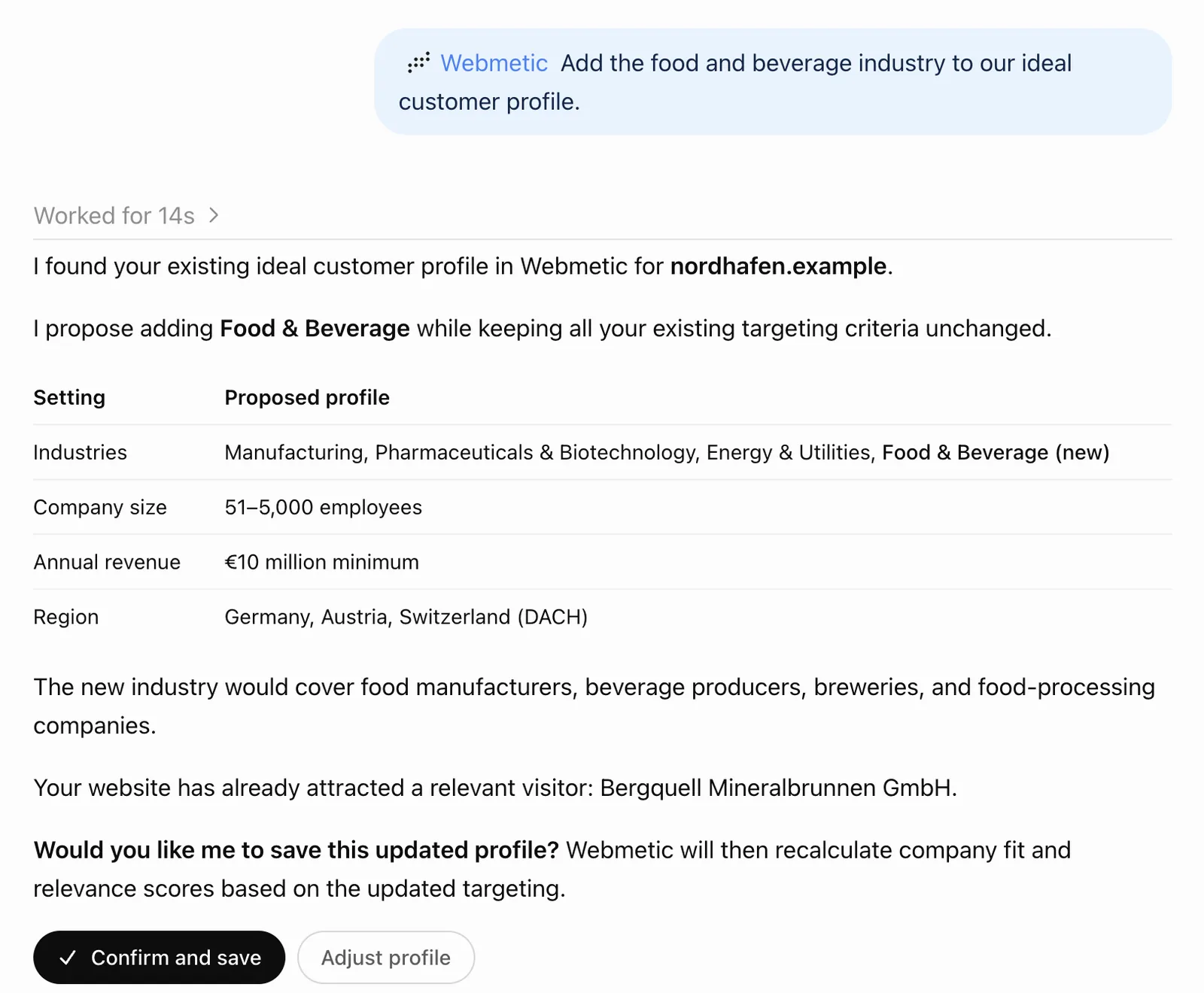
The draft of an extended ideal customer profile before ChatGPT saves it -
"Enable contacts for our account."
The assistant shows you the three consents from the dashboard. Once you confirm, Webmetic records the consents and adds your welcome credits. From then on, the assistant finds contacts at identified companies.
-
"Invite Anna Berger from sales, anna.berger@nordhafen.example."
Webmetic adds a user with the User role and sends the password by email. With these login details, the person connects their own AI assistant.
-
"Send me an email every Monday at 9 am with the returning companies."
The assistant shows you the type, day, time, and recipients and creates the notification once you confirm. Webmetic then sends the list of matching companies as an Excel file.
Sales
-
"What did Bergquell Mineralbrunnen do on our website this week?"
You see every visit with its time, duration, and source, plus the pages they read and events such as downloads.
-
"Has Hagedorn Papierwerke been back since our meeting on 14.10.2026?"
You see all visits from that day on. Webmetic reads dates like 14.10.2026 day first.
-
"Which companies are visiting us for the very first time, and through which channel?"
You see companies on their first ever visit and the source that brought them to your website.
-
"Who keeps coming back but hasn't submitted a form yet?"
You get the returning companies that submitted no form in that range.
-
"Which companies from Hamburg visited this week?"
You see companies whose registered address is in Hamburg. Webmetic doesn't pass the city of a visit to the assistant.
Marketing
-
"Which companies came from LinkedIn this month?"
You see companies with at least one visit from that source. Ask the same way for Google or your newsletter.
-
"What brings in more companies: paid ads or organic traffic?"
You see both shares side by side. Only links whose UTM parameters name a paid channel count as paid.
-
"Who from the dampfkessel-2026 campaign downloaded something?"
You see companies from the campaign with at least one download. The file names are in each company's visits.
-
"What do companies search for on our website?"
You get the terms that companies typed into the search on your website. The assistant reads the terms from the visits, company by company.
-
"How did this week compare with last week?"
You see both weeks side by side, with companies, visits, page views, sources, and events.
Management
-
"Monday briefing: what happened last week, and who should we contact?"
You get the numbers for the week, the most relevant companies, and the companies that visited for the first time.
-
"Compare this month with last month. Are we growing?"
You see companies, visits, and sources for both months side by side.
-
"Which company spent the most time on our site this week, and what did they look at?"
You see the company with the longest time on site and its visits page by page.
-
"Check my target accounts: Bergquell Mineralbrunnen, hagedorn.example, Kronfeld Chemie. Which of them visited in the last 30 days?"
For each name, you see whether the company visited your website, plus relevance, visits, and last visit. One question checks up to 50 names. "Not seen" only means that Webmetic identified no visit in that range or that the name is spelled differently. Check any match that isn't exact.
-
"Give the leadership team a short introduction to Fermtec Pharma."
You get the company's industry, size, address, offering, and target audience, plus its visits.
Find contacts
The assistant finds contacts at companies that visited your website. Contacts must be enabled for your account first. If they aren't yet, the assistant first asks you for the three consents and enables them in the chat. In the dashboard you set up contacts as described in Set up contacts.
The search is free. Unlocking an email address or a phone number costs credits. Your AI client asks before unlocking unless you have allowed it permanently.
Ask in two steps:
-
"Who are the marketing contacts at Bergquell Mineralbrunnen? Don't unlock anything yet."
You see up to 25 people with name and job title. For each person, the answer says whether an email address, phone number, and LinkedIn profile are on file. If you name no department, the departments from your Contact profile apply.
-
"Unlock the email address of the second person."
You get the email address and, if there is one, the LinkedIn profile. Data your account has already unlocked costs nothing when you ask for it again.
Webmetic searches the company's country first. If nobody matches there, the answer shows people worldwide. Name only one company per question, because the assistant searches one company per call.
Questions the assistant cannot answer
The assistant can't answer some questions from your data. Here is what to ask instead:
| Question | Why not | Ask instead |
|---|---|---|
| "Who clicked our phone number?" | The data contains no clicks on email and phone links. | "Who submitted a form this week?" |
| "Who is the managing director of Hagedorn Papierwerke?" | The company profile contains no managing directors and no email pattern. | "Find C-level contacts at Hagedorn Papierwerke." |
| "Which companies from Saxony visited?" | The data has no federal states, only cities and countries. | "Which companies from Dresden or Leipzig visited?" |
| "Which person visited the product page yesterday, and from which city?" | Webmetic identifies companies, not people. For the visit itself, the assistant only gets the country. | "Which companies visited the product page yesterday?" |
| "Only show companies with relevance above 80." | Relevance is a sort order, not a filter. You can set a minimum value only for activity. | "Show me the 10 most relevant companies this week." |
| "Show me every company from the last twelve months." | The assistant counts at most 600 companies per range. With more companies, the list and the numbers are incomplete, and the answer points this out. | Ask for shorter ranges, for example month by month. |
| "Show me my pricing page segment." | The assistant can't see segments or tags. | Describe the condition: "Who visited /pricing this week?" |
| "Tag Bergquell as Contacted and export the list." | The assistant doesn't add tags or export anything. | Add tags and export in the dashboard. |
| "Unlock the email addresses of everyone who visited this week." | The assistant finds contacts for one company per question. | "Find contacts at Bergquell Mineralbrunnen." |
Next steps
Tools and prompts
Your AI assistant reads your Webmetic data, sets up your account and answers questions from the documentation with these sixteen tools and six prompts.
Security and access
With your approval, the AI assistant reads your account's Webmetic data and sets the account up only when you tell it to.