

Smart Pages
Smart Pages change texts on your website for visits from identified companies.
You load a page of your website into the editor and pick headings, paragraphs, or buttons. For example, when Bergquell Mineralbrunnen visits the Nordhafen Anlagenbau website, the paragraph below the heading talks about filling systems for mineral water producers. Visitors who Webmetic doesn't match to a company always see the original text.
Start with Your first Smart Page.
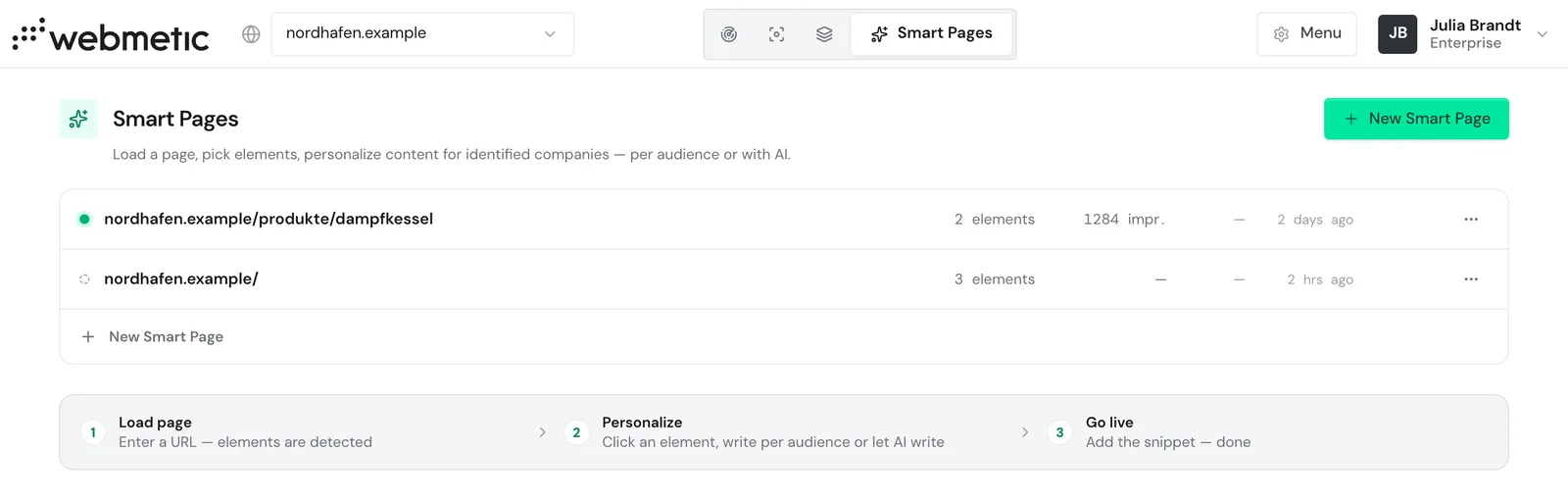
Open Smart Pages
Click the Smart Pages tab at the top. It sits in the top bar, not in the Menu. In a narrower window the tab shows only its icon, and the name appears when you point at it.
The link Smart Pages opens the page directly, for the first website in your account. For another website, first click your website's name in the top left and pick the website you want.
On a smartphone, choose Smart Pages in the dropdown at the top.
The editor needs a screen at least 1,024 pixels wide. On smaller screens you only see the list of your Smart Pages.
What Smart Pages change
A Smart Page belongs to one page of your website. For each element on that page, you choose one of two methods:
- AI text per company: The AI writes its own version of your text for each identified company.
- Your own text per audience: You write a text yourself for companies with certain traits, for example from one industry.
Webmetic doesn't change images, layout, or link targets. For details, see Editor, AI text per company, and Audiences.
The new texts appear only once your website contains the Smart Pages code, a separate code next to the tracking code. For data protection questions, contact Support.
How to test, go live, and read the results is described under Test and go live and Report. If something goes wrong, see Troubleshooting.
Who can use Smart Pages
You can design Smart Pages, preview them, and test them on your website on every plan. You can publish them and choose the AI text per company method only in the trial, the Growth plan, and Enterprise.
If your account loses this plan, for example at the end of the trial, a live page shows the status Paused: visible with Growth. Visitors then see the original text. After an upgrade, the Smart Page appears again.
White-label customers of a partner don't see the tab.
Every user of your account can create, edit, publish, and delete Smart Pages, even without admin rights.
Smart Pages cost no credits. Webmetic doesn't limit the number of pages, elements, or audiences.
Custom solutions
If you want your website to do more than show matching texts, we build a dedicated solution with you on the same data. For example, your website can then put the offer that fits each company first. For details, see Custom solutions.