

Relevance, activity, and fit
Relevance combines a company's activity on your website with how well it matches your ideal customer profile.
Relevance shows which companies your sales team should look at first. For example, a beverage maker that fits your ideal customer profile and read your pricing page several times this week sits at the top of the list. An equally active engineering firm outside your profile sits at the bottom.
Relevance is not a setting you weight yourself but comes from two values that Webmetic works out for every company: Activity and Fit.
From profile to relevance
- 1Ideal customer profileYou define which industries, sizes, and regions match your offer.
- 2FitWebmetic checks how well a company matches this profile.
- 3VisitsThe tracking code reports every visit the company makes to your website.
- 4ActivityWebmetic rates how many visits there were, how long they took, and how recent they are.
- 5RelevanceWebmetic combines fit and activity into a single value.
- 6Sort by Highest relevanceThe list shows the most relevant companies first.
Activity
Activity shows from 0 to 100 how closely a company looks at your website. It is the former lead score, which is why the export column is still called Lead Score.
Activity rises with these signals:
- Visits: more visits mean a higher value.
- Time on site: long visits count more than short ones.
- Pages: many pages per visit count more than a single page.
- Recency: a visit from yesterday counts more than one from a few weeks ago.
- Devices: visits from several devices or browsers count more than visits from one.
- Regularity: if a company keeps coming back to your website, its activity rises.
Webmetic scores activity again with every new visit that comes in.
The longer ago the last visit was, the more activity drops. That's why Webmetic also scores every company again at regular times, so the value falls even with no new visit.
Activity counts every recorded visit of a company, not only the visits in the selected period. So the period you pick above the list changes neither activity nor relevance.
Fit
Fit shows from 0 to 100% how well a company matches the ideal customer profile of the website it visited. Webmetic checks three criteria:
- Industry: the company's industry or NACE code.
- Size: the number of employees, the revenue, or both, depending on what your profile restricts.
- Region: Germany, DACH, or worldwide.
A criterion your profile leaves open counts as met. If the company has no data on its size or country, the criterion counts only in part. If its industry is unknown, the industry criterion does not match.
If a criterion you restricted clearly does not match, fit is 0%. The company then doesn't match your ideal customer profile.
Each website has its own ideal customer profile. So the same company can match two websites in your account to a different degree.
Calculation
Webmetic multiplies the two values: relevance is fit times activity. For example, fit of 50% and activity of 80% give a relevance of 40%.
Three rules follow from this formula:
- Relevance is never higher than activity.
- A company outside the profile has a relevance of 0, however active it is.
- Without an ideal customer profile, relevance equals activity. The same applies to a profile with every criterion left open.
| Situation | Fit | Relevance |
|---|---|---|
| No ideal customer profile | not applicable | equals activity |
| Company matches every criterion | 100% | equals activity |
| Company matches in part | between 0 and 100% | lower than activity |
| Company is outside the profile | 0% | 0 |
Triggers for new values
Four events change a company's values:
- New visits: Webmetic scores activity again as soon as a new visit comes in.
- Time without a visit: the regular rescoring lowers activity step by step.
- A changed ideal customer profile: Webmetic rescores every company of that website right away, and the list reloads about two seconds later.
- New company data: if a company's industry, size, or country changes, Webmetic adjusts its fit the next time it updates that company.
An AI suggestion for the ideal customer profile also takes effect right away, even if you don't confirm it. You can't set activity yourself, only the ideal customer profile.
Display in the dashboard
Relevance, activity, and fit are available on every plan. On the Free plan, Webmetic shows no values for companies whose names you can't see.
- List: a thin bar on the left edge of each company card shows the relevance; its height and color change with the value, but the list shows no number. The default sort is Highest relevance; with Highest activity you sort by activity alone. The company list describes every sort option.
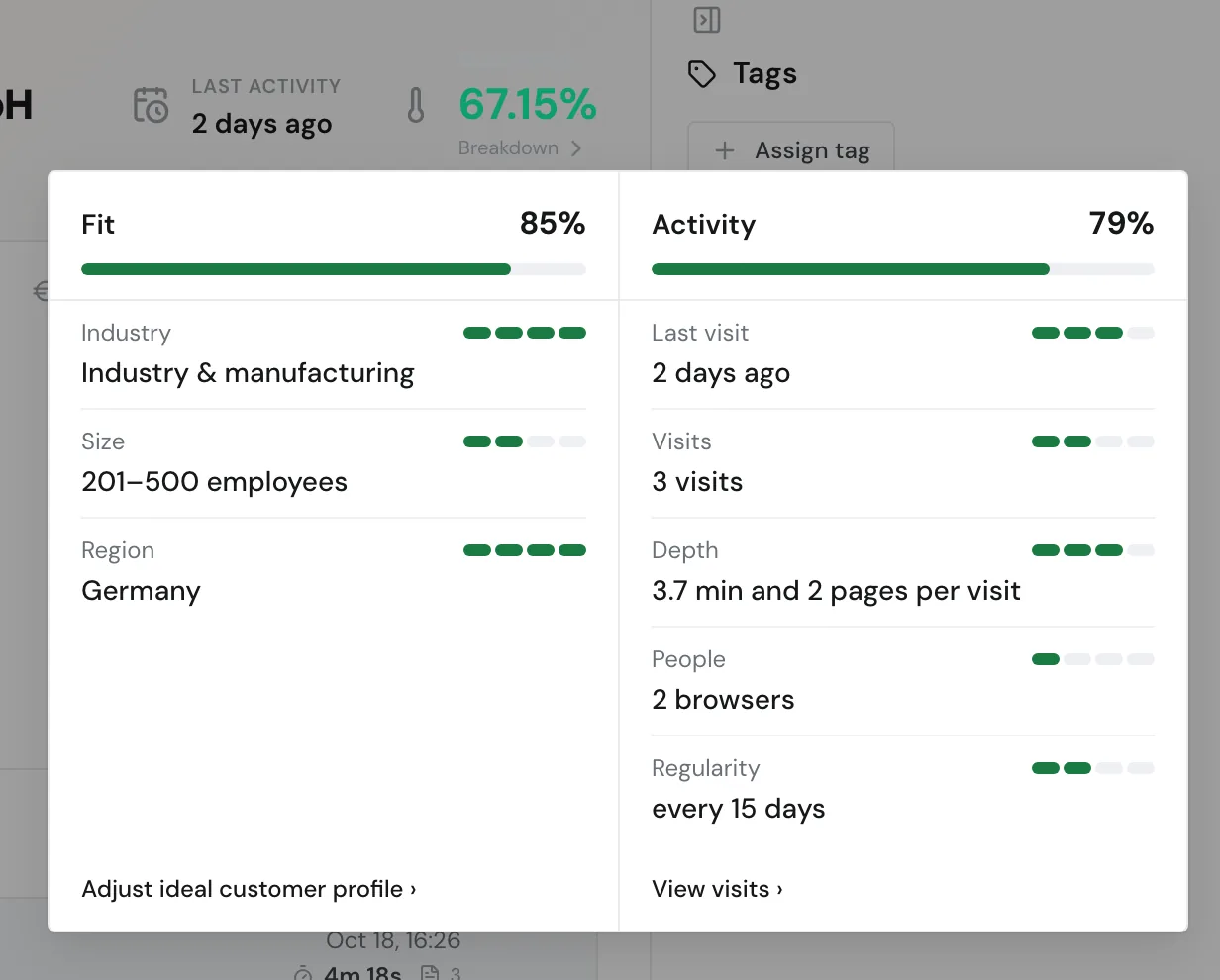
- Company profile: at the top of the profile, Relevance shows the value in percent. Breakdown sits below it. When you click the number or rest the mouse pointer on it for a moment, a card opens.
- Export: the columns Lead Score, Relevance, and Fit are ones you can pick in the export.
- Other channels: notifications, the HubSpot integration, the API, and the AI assistant deliver the values too.
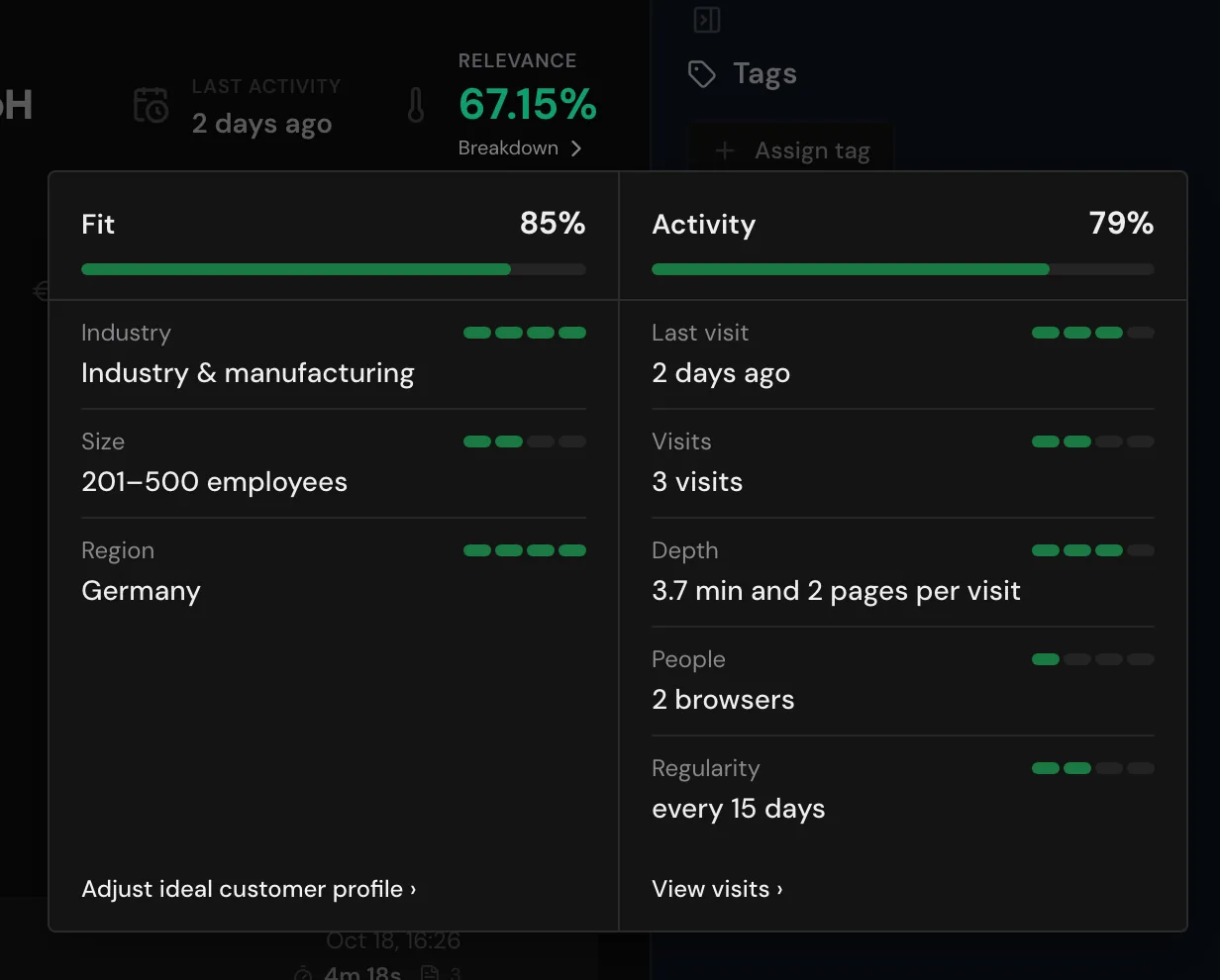
The card has two columns: Fit on the left, Activity on the right. At the top of each column you see the share in percent and a bar.
Each row names the company's value and shows with four steps how much it counts. Gray steps mean the value is missing.
- Fit: Industry, Size, and Region. If a criterion doesn't match, the line below says what your profile looks for, for example "looking for: Germany". Without an ideal customer profile, the column shows no rows.
- Activity: Last visit, Visits, Depth (minutes and pages per visit), People (the number of browsers), and Regularity (the gap between visits, from three visits on).
At the bottom, the Adjust ideal customer profile link opens the website's profile. Without a profile, the link reads Create ideal customer profile. With View visits, you open the company's visits.
Limits
- Own weights: you can't adjust activity or set your own rules. You control the values only through the ideal customer profile.
- History: Webmetic keeps no history of the values, so you see no trend per company.
- Filters: segments, filters, and notifications don't offer relevance, activity, or fit as a condition. Sort by Highest relevance instead.
- Countries: the region only knows Germany, DACH, and worldwide, no single countries or postal codes.